

Start from what buyers research, not what you sell
Your buyers don’t search for your product’s name. They read about the problem it solves, the options they’re weighing, and the job they’re trying to get done. Write keywords from their side:
A good test: would someone read about this only when they’re close to buying? “Payroll compliance” passes. “Small business tips” doesn’t.
Use topics we already track first
When you type in the keyword search, every result is a topic we already track. Pick those first:- They’re live at once, with history, so the lane counts people from its first check.
- A new keyword you request takes about a day to approve, then 2 to 4 days before anyone shows up, with no backfill. It also needs a balance.
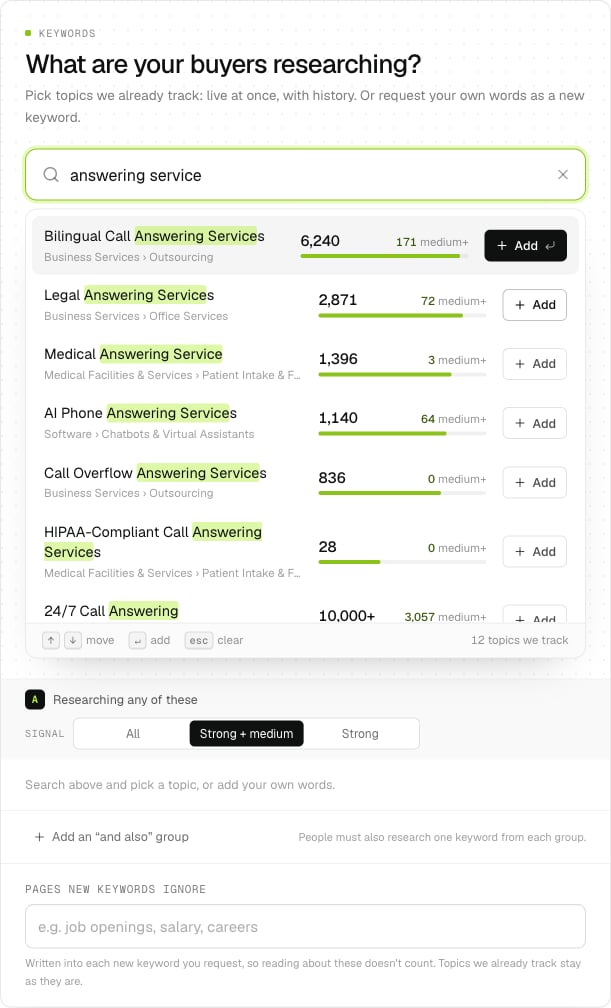
Each result shows how many people researched it on the latest day, and how many at medium+.
Read the numbers
Every topic shows three things:- The count: people who researched it on the latest day, before any filter. It stops at 10,000+.
- medium+: how many of them researched it at medium or strong signal. At the default signal, this is the number that matters.
- The bar: its size next to the other topics in view, on a log scale, so a small topic still shows next to a big one.
These are one-day counts for comparing topics. They aren’t people you can export: your lane counts the last 14 days, after your filters, less anyone you’ve exported this month.
Let the suggestions do some of the work
With the search empty, two rows of suggestions appear:- Suggested for you comes from the lane’s Who you sell to. A specific description gives better suggestions: “Houston medical and legal offices looking for an answering service” beats “small businesses”.
- More like your keywords comes from what you’ve already picked.
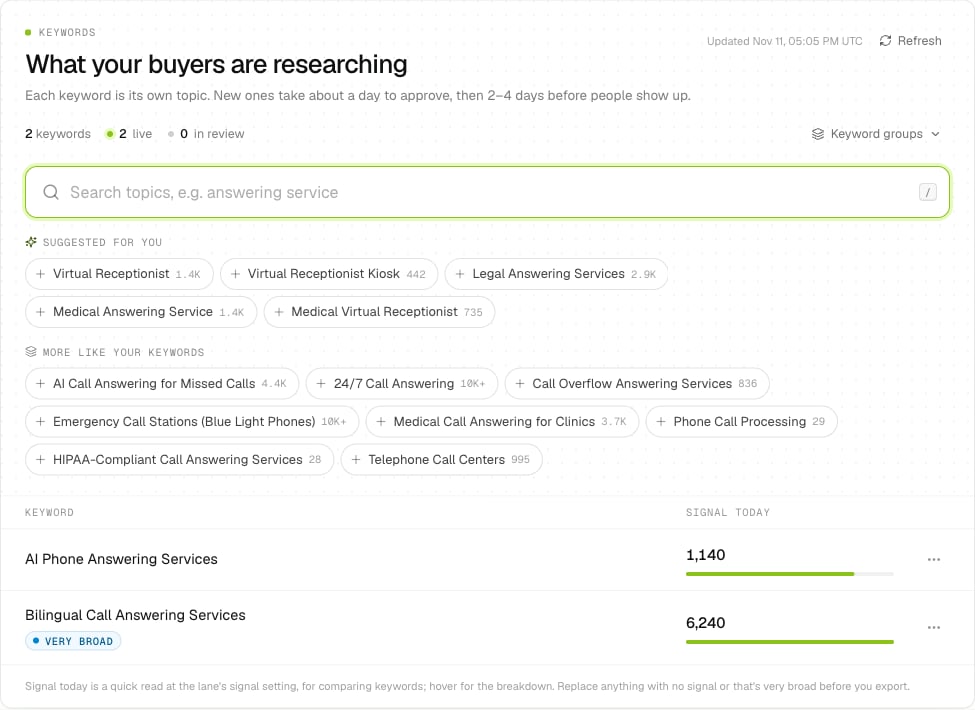
On a lane's Keywords tab, click the search to see suggestions.
Mix a few specific topics with one broader one
Group A finds people researching any of its keywords, so every keyword you add brings more people in. A good start is two to five specific topics that describe the problem closely, plus one broader topic for reach. If the lane is too big, don’t remove the specific topics: narrow it with filters, or with an “and also” group.Require two interests with “and also” groups
Add an “and also” group (B, C or D) when the right buyer researches two things. People must research any keyword in group A and at least one keyword from each other group you use, on any day in the last 14. For example, an answering service for clinics could use:
The lane then finds people looking at medical answering services who are also checking compliance. Each group has its own signal setting. Groups B to D start at All; raise one only if the lane is still too big.
Pick a signal level
You can change it any time on the lane’s Filters tab, under Signal and target accounts. Counts update from the next check.
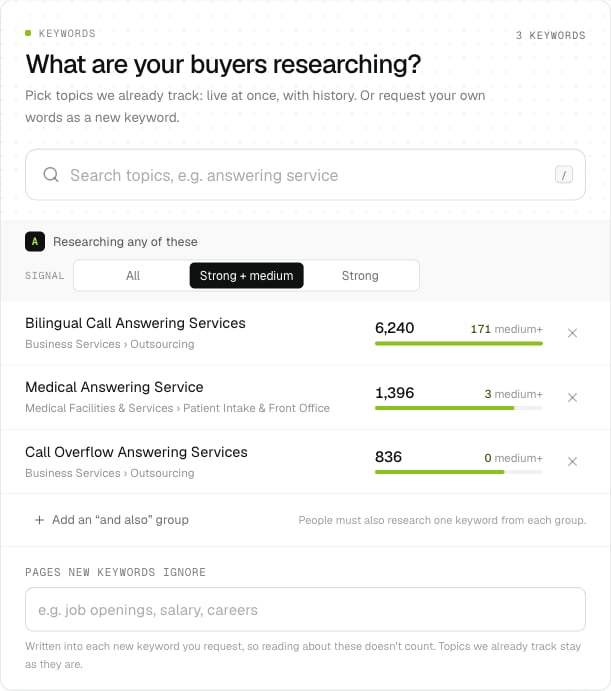
Signal is set per group. Group A's is the lane's signal.
Treat warnings as cues
On a lane’s Keywords tab, each keyword shows its signal today, and a flag when something needs a look:- Very broad: thousands of people research it every day. It’s likely to bring in people who aren’t buying. Swap it for something more specific, or narrow the lane with filters.
- No signal yet: nobody researched it on the latest day. Replace it, unless it went live in the last few days (then it says First results take 2–4 days).
- Awaiting approval, Approved or Not approved: where a new keyword is. Reword a rejected one, usually more specifically.
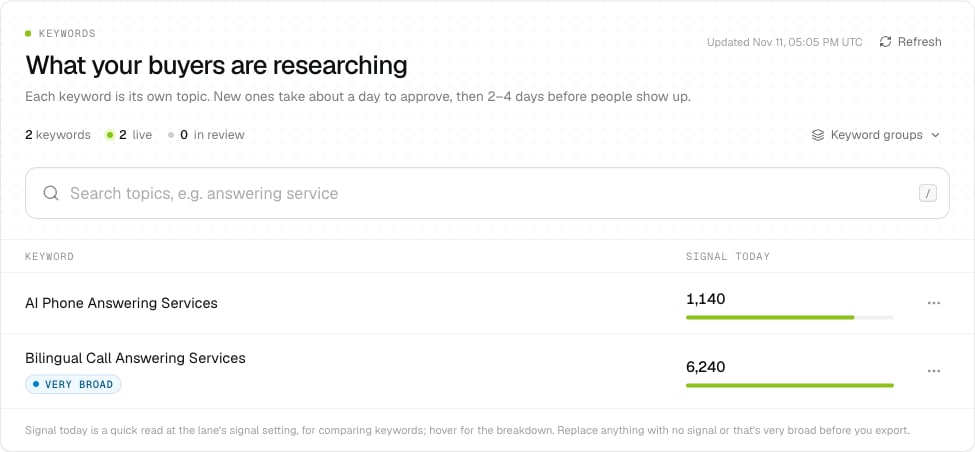
Replace anything with no signal, or that's very broad, before you export.
Leave out reading that doesn’t count
Pages new keywords ignore, under the keywords, takes words like “job openings”, “salary” or “careers”. They’re written into each new keyword you request, so reading about them doesn’t count. Topics we already track stay as they are. To leave out companies or people, use Do not contact. To leave out kinds of company or roles, use the lane’s filters.Before you export
- At least one keyword has medium+ people.
- Nothing shows No signal yet, and anything Very broad is narrowed or swapped.
- The signal matches how big the lane is.
- Example matches on the Overview tab look like people you’d want to call.