

intentleads command does everything the API does, with a free quote before every export.
Install
Works on macOS and Linux with Node.js 18 or newer.curl -fsSL https://intentleads.si/install.sh | sh
~/.local/bin/intentleads. Then sign in with an API key from Settings → API keys. Connect → CLI on the same page has the install and sign-in commands ready to copy.
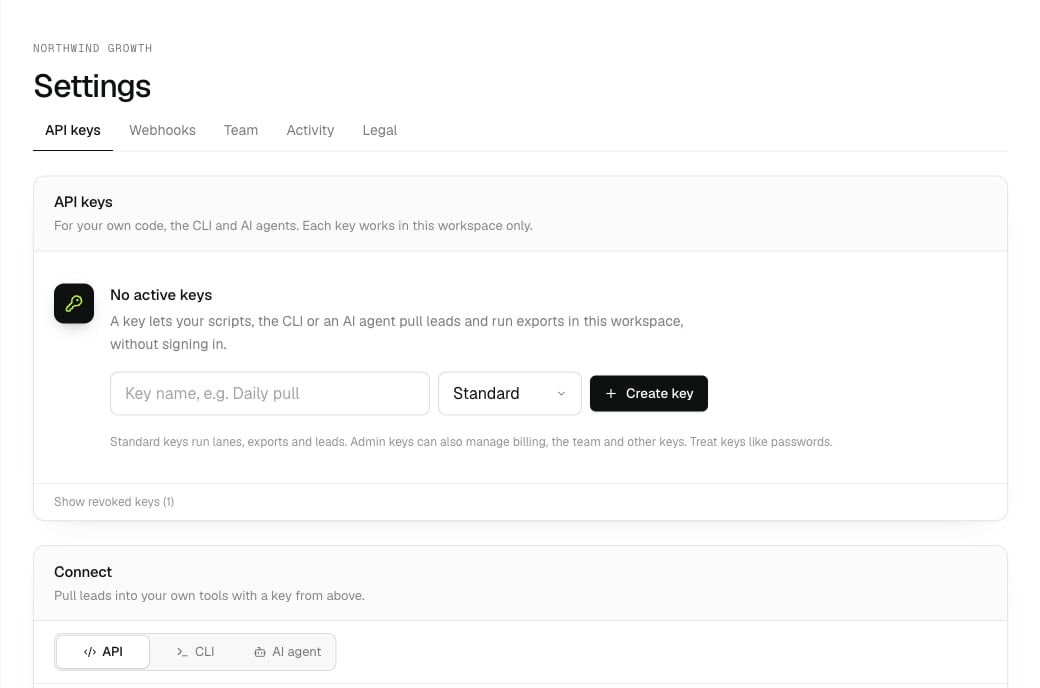
Create a key in Settings → API keys. Connect → CLI has the commands.
intentleads login --key il_live_...
intentleads whoami
whoami shows your organization and the CLI version. The key is saved in ~/.config/intentleads/config.json; INTENT_LEADS_KEY and INTENT_LEADS_URL in the environment override it.
Export new people
intentleads export --lane L1 --max 100 --format csv --out leads.csv
| Flag | Meaning |
|---|---|
--lane | L1, several like L1,L3, or all. |
--max | Most people to export. Default 100. |
--strength | low, medium or high. Default: each lane’s own minimum. |
--dry-run | Show the quote only. |
--yes | Don’t ask before buying. For scheduled jobs. |
--key | Your own idempotency key, so a retried job never buys twice. Default: a new random key. |
--format | csv or json. |
--out | Save to a file instead of printing. |
For a weekly job,
intentleads export --lane all --max 500 --yes --format csv --out "leads-$(date +%F).csv". Each person counts once per billing period, so you never pay for the same person twice.Commands
| Command | What it does |
|---|---|
intentleads lanes list | Lanes with keywords and how many new people are available. |
intentleads lanes show L1 | One lane’s keywords, counts and filters. |
intentleads lanes create --file lane.json | Create a lane. See Lanes for the fields. |
intentleads lanes update L1 --file patch.json | Change filters or settings; omitted fields keep their value. |
intentleads lanes rules L1 [--file rules.json | --json '{...}' | --clear] | Show or replace a lane’s more filters. |
intentleads catalog [--search plastics] | Valid industries and seniority values for filters. |
intentleads catalog fields [--search revenue] | Every field more filters can use, with its operators and values. |
intentleads checks run --lane L1 | Re-size a lane now (or --lane all), e.g. after changing filters. Free. |
intentleads checks --lane L1 | The check in progress and recent checks. |
intentleads export … | Quote and export new people (see above). |
intentleads exports list | Past exports. |
intentleads exports get ID [--format csv] [--out FILE] | Download an export again (always free). |
intentleads leads pull [--lane L1] [--since last|YYYY-MM-DD] [--consumer NAME] | Leads you haven’t pulled yet, or everything since a date. See Leads. |
intentleads leads sample --lane L1 | Latest free sample (no contact details). |
intentleads topics search "answering service" | Topics we already track: live now, with history. See Keywords. |
intentleads topics show tp503611 | What a topic covers, related terms and its size. |
intentleads keywords add --lane L1 --topic tp503611 [--group B] | Add an existing topic: live at once. |
intentleads keywords add --lane L1 [--group B] [--new] "keyword" | Add a keyword, to group A by default. A name that matches an existing topic uses it, unless --new. New keywords need a balance; until you top up, use --topic. See Keyword groups. |
intentleads keywords move --lane L1 --group B "keyword" | Move a keyword to another group. |
intentleads keywords remove --lane L1 "keyword" | Remove a keyword. |
intentleads exclusions | How many companies and people are left out of every lane. |
intentleads exclusions add example.com jane@example.com | Leave out companies (domains, company LinkedIn pages) and people (emails, email hashes, LinkedIn profiles). With --file list.csv, add --people for a list of people. |
intentleads exclusions remove VALUES… | Stop leaving them out; --all clears both lists (or --all --companies, --all --people). |
intentleads exclusions replace --file list.csv [--people] | Replace a whole list. |
intentleads exclusions list | The companies left out. |
intentleads companies | Your target accounts list. |
intentleads companies add|remove VALUES… [--file list.csv] | Add or remove companies. |
intentleads companies replace --file list.csv | Replace the list. |
intentleads companies delete | Delete the list. |
intentleads org / intentleads org rename "New name" | Your organization; renaming needs an admin key. |
intentleads suppressions [--since YYYY-MM-DD] | People who asked to be removed. |
intentleads balance | Your balance, this month per meter, and the prices (usage does the same). |
intentleads topup 500 | A payment page to top up $500 ($250 minimum). Admin key. |
intentleads autotopup | The automatic top-up: amount, low-balance threshold, card and last charge. Admin key. |
intentleads autotopup --amount 500 --threshold 50 | Turn it on or change it: adds $500 when the balance drops below $50, and on the billing day. With no card yet, prints a link to add one. Admin key. |
intentleads autotopup --off | Turn the automatic top-up off. Admin key. |
intentleads cost intent|search 1000 | What that many more people would cost now. Free. |
intentleads limits ID [--budget USD] | Show or set a workspace’s monthly budget in dollars, across intent leads, search and website visitors (--budget none removes it). Admin key to set. |
intentleads use WORKSPACE | With an organization key: act in that workspace from now on (id or name). intentleads use --none stops. |
--workspace ID | On any command, with an organization key: act in that workspace this once. |
intentleads workspaces | Your workspaces, with this month’s people and dollars. |
intentleads workspaces create "Client name" / workspaces key ID | Create a workspace, or an API key for one. Admin key. |
intentleads workspaces members ID | Who can open a workspace (organization or workspace users), and its open invites. Admin key. |
intentleads workspaces invite ID [--email E] [--role member|owner] | A one-time link to that workspace only. Admin key. |
intentleads workspaces remove ID USER_ID | Take someone’s workspace access away. Admin key. |
intentleads webhooks | Your webhook endpoints: URL, events, status. |
intentleads webhooks add URL [--events removals,visitors] | Add an endpoint. Events default to all of them. Admin key. |
intentleads webhooks update ID [--url URL] [--events all|visitors] [--disable|--enable] [--rotate-secret] | Change an endpoint. Admin key. |
intentleads webhooks test ID [--event removals|visitors] | Send a signed test now (a ping or a made-up sample) and print what your endpoint answered. |
intentleads webhooks attempts ID / webhooks secret ID / webhooks remove ID | Recent deliveries; the signing secret (admin key); delete an endpoint (admin key). |
intentleads whoami | Your organization and the CLI version. |
intentleads --version | The CLI version. |
--json to lanes, lanes rules, catalog fields, checks, leads sample and suppressions for machine-readable output. intentleads <command> --help shows one command’s help.