

1. Create one
In the dashboard, press New lane on Lanes and pick Search; Build a list with Search walks through it. On the lane’s page, the Everyone must have switches save and recount as you flip them, and Recount asks for a new free estimate.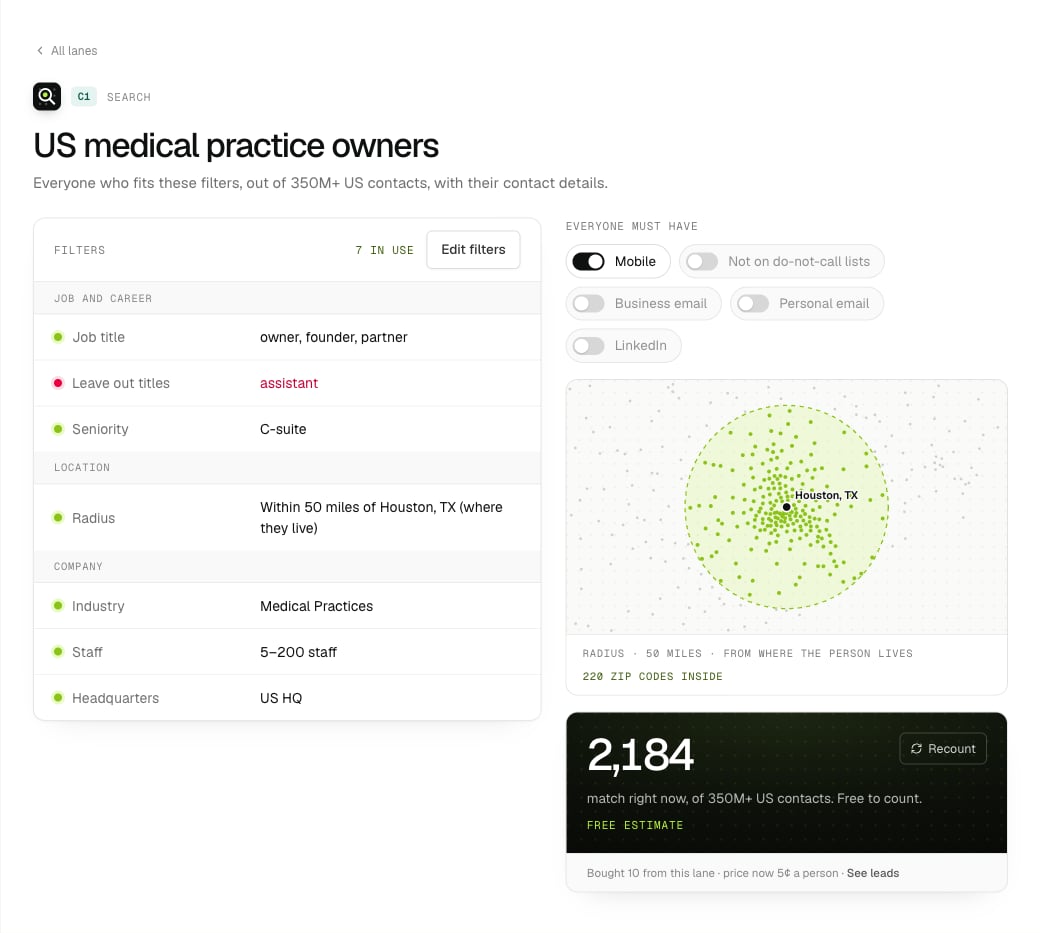
A search lane: its filters, must-haves, radius and the free estimate.
S1, S2 and so on (older ones are C1, C2). They have no keywords, audience or topics to leave out. Every other filter works as it does on intent lanes, including more filters and your target accounts. "kind": "contacts" still works as another name for "search".
Filters
The dashboard’s search form shows each filter on its own row, in five groups. Most of them are stored as the lane’sconditions, so the API, CLI and MCP see exactly what the form shows.
Anything else, like OR groups or other fields, goes under Advanced: AND / OR groups at the bottom of the form.
For example, dental practice owners and partners within 50 miles of Houston with 10 or more years of experience, at practices whose description mentions implants, leaving out group practices:
2. Get a free estimate
GET /api/v1/lanes/S1/estimate until status is done (we also email you). You get people and up to 10 real people as a sample (name, job title, company, size, industry and location, and whether an email, phone and LinkedIn are on file; no contact details).
Your first 5,000 people are prepared at the same time, for free, so an export right after the count arrives in about a minute. Creating a search or changing its filters starts both straight away.
The same filters within 24 hours return the same estimate. Change the filters and ask again for a fresh count. From the CLI: intentleads estimate S1 --wait.
3. Export
Exports work the same as for intent lanes: quote first (free), then export.- Paid from your balance at search prices, per person delivered. The quote shows the cost and your balance after.
- Each person is charged once, ever. Anyone you’ve already bought from any search lane is left out before we pay.
- Export search lanes and intent lanes separately: one export can’t mix them.
- The leads arrive like any other:
GET /api/v1/leads, withlaneset to the search lane and the intent fields empty.