Filter 350M+ US contacts down to your market, get a free estimate and sample, and export the people you want.
At the end of this guide you’ll have a search lane with a free estimate of everyone who fits, a sample to sanity-check it, and a CSV of the people you bought.Search has no keywords: it’s everyone who matches your filters, whether they’re researching anything or not. Use it for full market lists, and for people who rarely research online, like practice owners, clinic managers and trades. The example is owners of medical practices around Houston, with a mobile.
1
Start a search
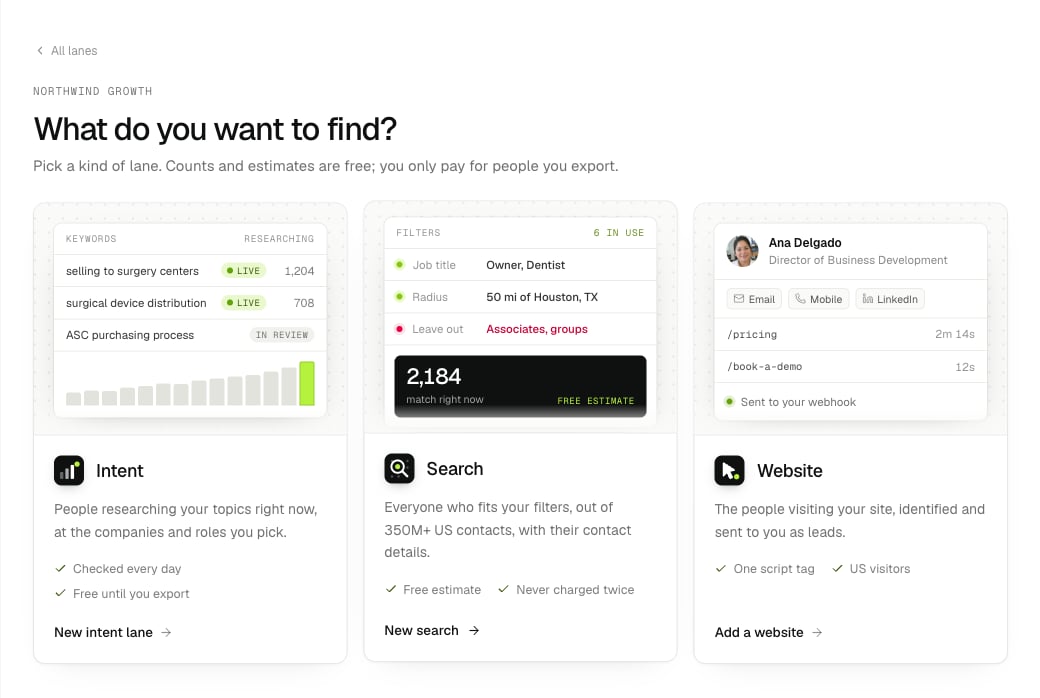
On Lanes, press New lane and pick Search. Or press ⌘K and choose New search.
Pick Search: a free estimate first, and never charged twice.
Give it a Name, like “US medical practice owners”. Notes at the bottom are optional: a line for your team about who the list is for.
2
Choose what everyone must have
The first section, Each person must have, sets which contact details everyone on the list has. A mobile number is on to start with. You can also require:
a mobile not on do-not-call lists,
a business email, or one checked as valid,
a personal email,
a direct phone,
a LinkedIn profile.
Nobody without them is counted or exported, so you never pay for someone you can’t reach. Each one you add makes the list smaller, so pick only what your outreach needs.
3
Add filters
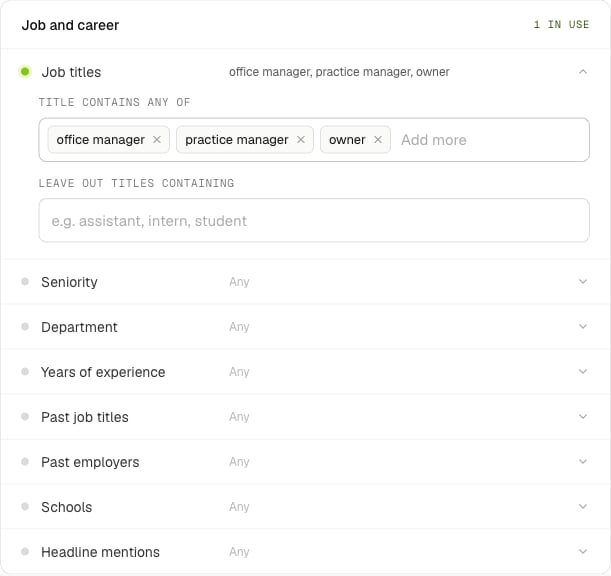
The rest of the form has the same filters as an intent lane: Job and career, Location and Company, then Advanced: AND / OR groups. Click a row to open it. For the example:
Section
Filter
Setting
Job and career
Job titles
contain “owner”, “founder” or “partner”; leave out “assistant”
Job and career
Seniority
C-suite
Location
Radius
50 miles of Houston, TX, measured from where the person lives
Company
Industry
Medical Practices
Company
Company size
5 to 200 staff
Company
US-headquartered companies only
On
Each section is a set of rows. Open one to set it; a green dot means it's in use.
The panel on the right lists your filters in plain words as you go. Target the right people explains when to use which filter.
4
Create it and get the free estimate
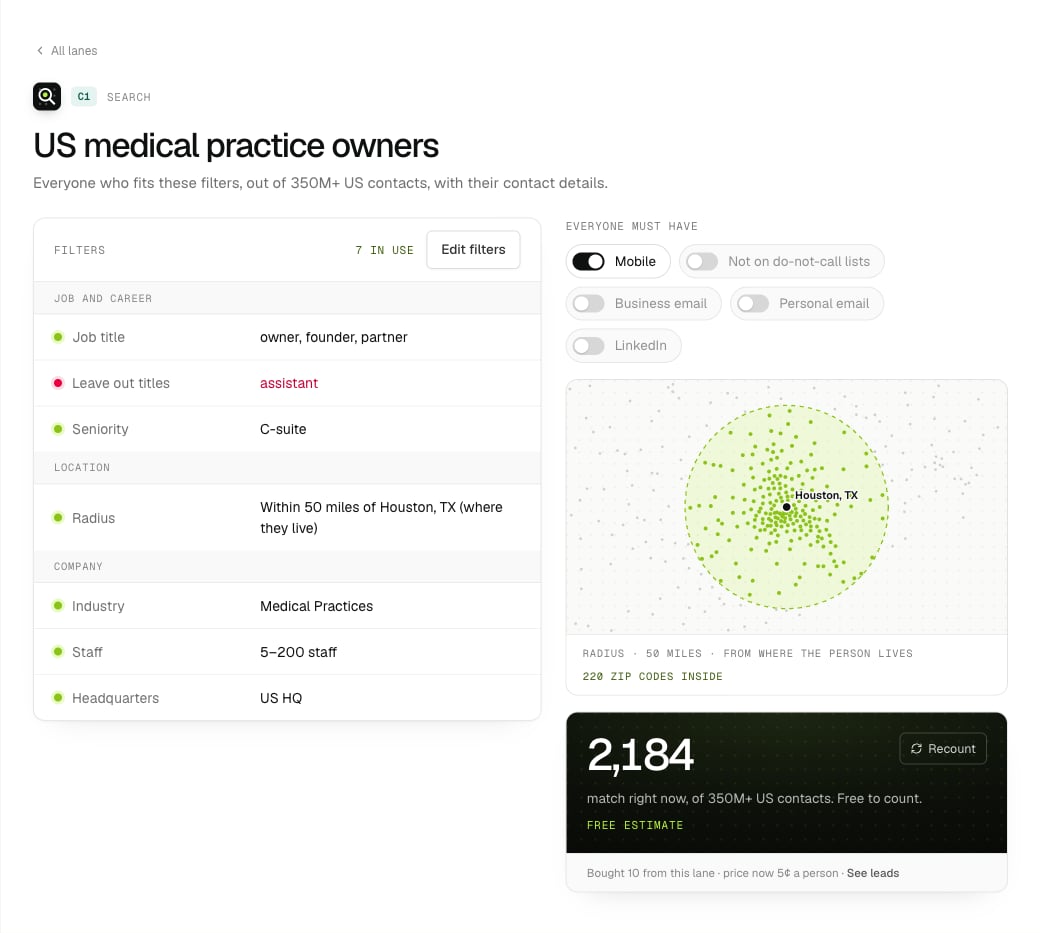
Press Create search. The free estimate starts straight away and takes about 50 minutes; the page shows when it should be ready, and we email you when it is. Your first people are prepared at the same time, so you can export the moment the count lands, or press Export before that and the export starts by itself when they’re ready.
A search lane: filters on the left, must-haves, the radius and the free estimate on the right.
The dark tile shows how many people match right now, out of 350M+ US contacts. Asking again with the same filters within a day returns the same estimate.
5
Check the sample
Under the estimate, Free sample shows a few people who match: their seniority or department, company, staff count, industry and city, and icons for whether a business email, a phone and LinkedIn are on file. Names, titles and contact details come with the export.If the companies or roles look wrong, change the filters before you buy.
6
Tune it
The Everyone must have switches on the lane page (in the screenshot above) cover Mobile, Not on do-not-call lists, Business email, Personal email and LinkedIn. Flip one and it saves at once, then recounts for free.
The map shows your radius and how many ZIP codes it covers.
Edit filters changes anything else. Recount asks for a new estimate, also free.
7
Export
Under the estimate, type how many people you want. The button shows the price as you type, like Export 1,000 for $50.00. That’s a free quote: press the button to buy.
Search results cost 5¢ each for the first 50,000 in a month, then less. See Billing.
Each person is charged once, ever. Anyone you’ve already bought from any search lane is left out before you pay.
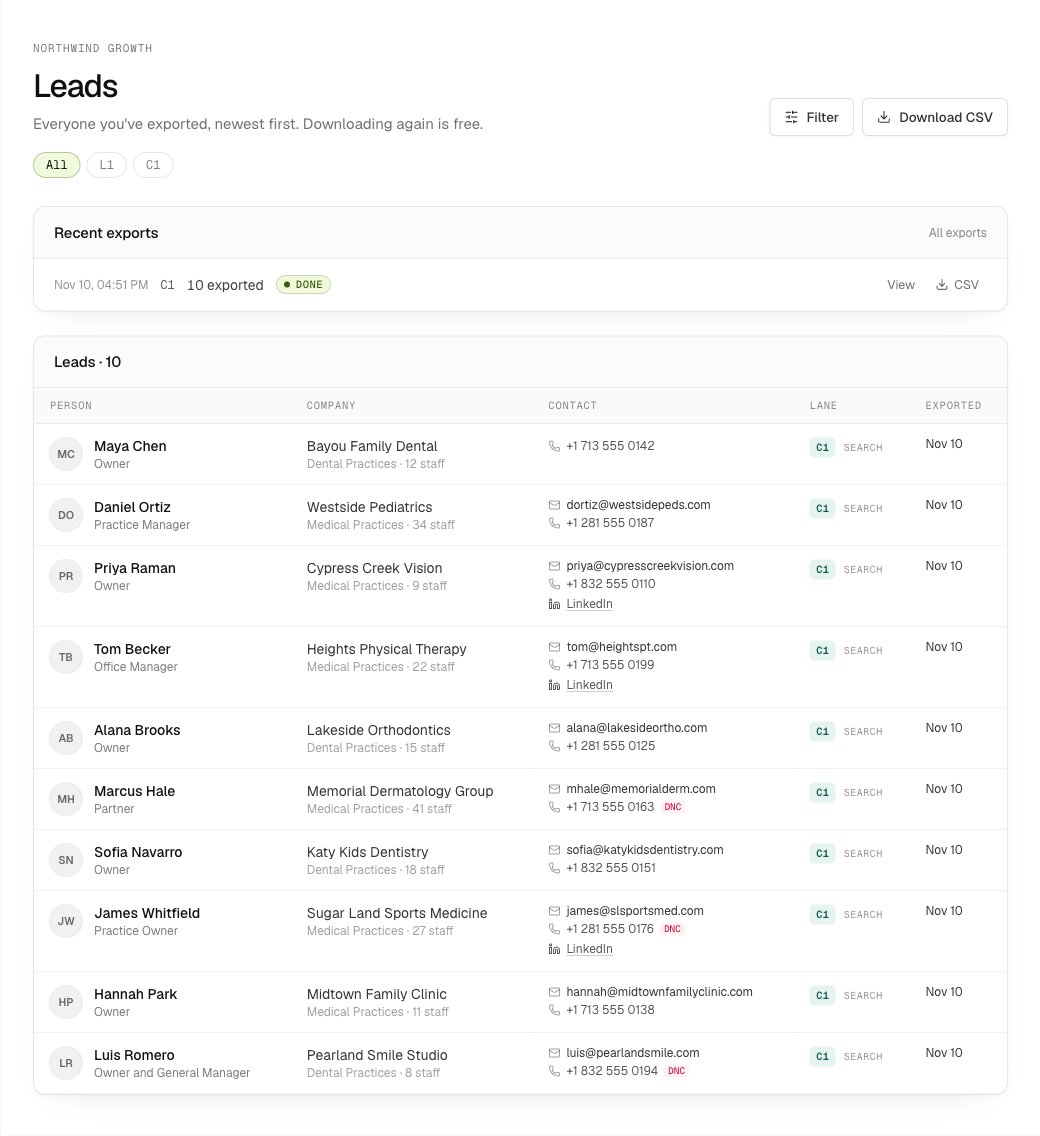
An export of people already prepared takes about a minute (the panel says so before you confirm). Follow it in Leads, then press CSV next to it under Recent exports.
Leads: each export and everyone in it, with their contact details.
Search and intent lanes export separately: one export can’t mix them.
Next
Target the right people
Worked examples for titles, size, radius and must-haves.
More filters
Every field, operator and value, for AND / OR groups.
Search over the API
Create search lanes, estimate and export from code.
Lead fields
Every column in the CSV.
{"docsConfig":{"theme":"mint","$schema":"https://mintlify.com/docs.json","name":"Intent Leads","description":"B2B intent leads: people researching what you sell this week, with business emails, phones and LinkedIn. Dashboard, REST API, CLI and MCP.","colors":{"primary":"#5E8C0F","light":"#B5F23D","dark":"#5E8C0F"},"logo":{"light":"https://mintcdn.com/intentleads/16GfXNJlPs26aspr/logo/light.svg?fit=max\u0026auto=format\u0026n=16GfXNJlPs26aspr\u0026q=85\u0026s=7bb6e53db6fb91e6a3436904538f33af","dark":"https://mintcdn.com/intentleads/16GfXNJlPs26aspr/logo/dark.svg?fit=max\u0026auto=format\u0026n=16GfXNJlPs26aspr\u0026q=85\u0026s=ee1b9cbb31f2daef4d4238be856e7414","href":"https://intentleads.si"},"favicon":"https://mintcdn.com/intentleads/16GfXNJlPs26aspr/favicon.svg?fit=max\u0026auto=format\u0026n=16GfXNJlPs26aspr\u0026q=85\u0026s=ce7f30343f2c0ac51ac9c53cf045a1fd","api":{"openapi":"api-reference/openapi.json","playground":{"display":"interactive"},"examples":{"languages":["curl","javascript","python"]}},"appearance":{"default":"light"},"background":{"color":{"light":"#FFFFFF","dark":"#07090A"}},"navbar":{"links":[{"href":"https://intentleads.si","label":"Website"},{"href":"mailto:support@intentleads.si","label":"Support"}],"primary":{"type":"button","label":"Dashboard","href":"https://intentleads.si/dash"}},"footer":{"socials":{"website":"https://intentleads.si"},"links":[{"header":"Intent Leads","items":[{"label":"Website","href":"https://intentleads.si"},{"label":"Pricing","href":"https://intentleads.si/pricing"},{"label":"Dashboard","href":"https://intentleads.si/dash"},{"label":"Terms","href":"https://intentleads.si/terms"},{"label":"Guides","href":"https://intentleads.si/guides"},{"label":"About","href":"https://intentleads.si/about"}]},{"header":"Docs","items":[{"label":"Get started","href":"/get-started/first-intent-lane"},{"label":"FAQ","href":"/faq"},{"label":"API quickstart","href":"/quickstart"},{"label":"API reference","href":"/api-reference/introduction"},{"label":"CLI","href":"/cli"},{"label":"MCP","href":"/mcp-setup"}]}]},"search":{"prompt":"Search the Intent Leads docs"},"seo":{"metatags":{"og:site_name":"Intent Leads"}},"icons":{"library":"lucide"},"styling":{"eyebrows":"breadcrumbs","codeblocks":{"theme":{"light":"github-light","dark":"github-dark"}},"latex":true},"contextual":{"options":["copy","view","chatgpt","claude","cursor"],"display":"toc"},"navigation":{"pages":[]}},"deployment":{"deploymentMetadataValue":{"subdomain":"intentleads","hasAudioNarration":false,"actualSubdomain":"intentleads","customDomains":["docs.intentleads.si"],"gitSource":{"type":"github","owner":"dropoutsanta","repo":"intentleads-docs","deployBranch":"main","contentDirectory":"","isPrivate":true,"mountPath":"","label":""},"entitlements":{},"buildId":"6af76867cc23cd287336fa6b","clientVersion":"0.0.4143","searchFilterCounts":[{"language":"default","tag":"API reference","count":97},{"language":"default","tag":"Endpoints","count":96},{"language":"default","tag":"Guides","count":29},{"language":"default","tag":"Workspaces","count":19},{"language":"default","tag":"Webhooks","count":13},{"language":"default","tag":"How it works","count":9},{"language":"default","tag":"Billing","count":9},{"language":"default","tag":"Exclusions","count":9},{"language":"default","tag":"Lanes","count":7},{"language":"default","tag":"Get started","count":5}]},"assistantConfig":{"enableAskAiButton":false,"enableStarterQuestions":false,"enableContextualStarterQuestions":false,"enableAskAiSearchBar":true},"basePath":"","hasChatPermissions":false,"hasWebMcpPermissions":false,"toggles":[{"name":"kill-isr","enabled":true,"variant":{"name":"disabled","enabled":false,"feature_enabled":true},"impressionData":false},{"name":"custom-rbac-roles","enabled":true,"variant":{"name":"disabled","enabled":false,"feature_enabled":true},"impressionData":false},{"name":"agent-mintlify-slack","enabled":true,"variant":{"name":"disabled","enabled":false,"feature_enabled":true},"impressionData":false},{"name":"agent-integrations-settings","enabled":true,"variant":{"name":"disabled","enabled":false,"feature_enabled":true},"impressionData":false},{"name":"rbac-expansion","enabled":true,"variant":{"name":"disabled","enabled":false,"feature_enabled":true},"impressionData":false},{"name":"automations-pr-grouping","enabled":true,"variant":{"name":"disabled","enabled":false,"feature_enabled":true},"impressionData":false},{"name":"custom-prefix","enabled":true,"variant":{"name":"disabled","enabled":false,"feature_enabled":true},"impressionData":false},{"name":"analytics-v7","enabled":true,"variant":{"name":"disabled","enabled":false,"feature_enabled":true},"impressionData":false},{"name":"user-flows-analytics","enabled":true,"variant":{"name":"disabled","enabled":false,"feature_enabled":true},"impressionData":false},{"name":"no-publish-flow","enabled":true,"variant":{"name":"disabled","enabled":false,"feature_enabled":true},"impressionData":false},{"name":"workos-onboarding","enabled":true,"variant":{"name":"disabled","enabled":false,"feature_enabled":true},"impressionData":false},{"name":"snapshot-serving-live","enabled":true,"variant":{"name":"disabled","enabled":false,"feature_enabled":true},"impressionData":false},{"name":"stripTemperatureMiddleware","enabled":true,"variant":{"name":"disabled","enabled":false,"feature_enabled":true},"impressionData":false},{"name":"support-platform-pylon-zendesk","enabled":true,"variant":{"name":"disabled","enabled":false,"feature_enabled":true},"impressionData":false},{"name":"snapshot-serving","enabled":true,"variant":{"name":"disabled","enabled":false,"feature_enabled":true},"impressionData":false},{"name":"instant-rollback","enabled":true,"variant":{"name":"disabled","enabled":false,"feature_enabled":true},"impressionData":false},{"name":"granular-notifications-server","enabled":true,"variant":{"name":"disabled","enabled":false,"feature_enabled":true},"impressionData":false},{"name":"granular-notifications","enabled":true,"variant":{"name":"disabled","enabled":false,"feature_enabled":true},"impressionData":false},{"name":"automations-fable","enabled":true,"variant":{"name":"disabled","enabled":false,"feature_enabled":true},"impressionData":false},{"name":"fixed-ai-action-pricing","enabled":true,"variant":{"name":"disabled","enabled":false,"feature_enabled":true},"impressionData":false},{"name":"automation-resolve-merge-conflict","enabled":true,"variant":{"name":"disabled","enabled":false,"feature_enabled":true},"impressionData":false},{"name":"scoped-publishing","enabled":true,"variant":{"name":"disabled","enabled":false,"feature_enabled":true},"impressionData":false},{"name":"mintql","enabled":true,"variant":{"name":"disabled","enabled":false,"feature_enabled":true},"impressionData":false},{"name":"page-level-analytics","enabled":true,"variant":{"name":"disabled","enabled":false,"feature_enabled":true},"impressionData":false},{"name":"editor-version-history-v2","enabled":true,"variant":{"name":"disabled","enabled":false,"feature_enabled":true},"impressionData":false},{"name":"billing-page-v2","enabled":true,"variant":{"name":"disabled","enabled":false,"feature_enabled":true},"impressionData":false},{"name":"full-page-search","enabled":true,"variant":{"name":"disabled","enabled":false,"feature_enabled":true},"impressionData":false},{"name":"workspace-projects","enabled":true,"variant":{"name":"disabled","enabled":false,"feature_enabled":true},"impressionData":false},{"name":"assistant-v5","enabled":true,"variant":{"name":"disabled","enabled":false,"feature_enabled":true},"impressionData":false},{"name":"fork-pr-previews","enabled":true,"variant":{"name":"disabled","enabled":false,"feature_enabled":true},"impressionData":false},{"name":"revalidation-jwt","enabled":true,"variant":{"name":"disabled","enabled":false,"feature_enabled":true},"impressionData":false},{"name":"workos-sso-scim","enabled":true,"variant":{"name":"disabled","enabled":false,"feature_enabled":true},"impressionData":false},{"name":"hobby-abuse-scan","enabled":true,"variant":{"name":"disabled","enabled":false,"feature_enabled":true},"impressionData":false},{"name":"dashboard-inbox","enabled":true,"variant":{"name":"disabled","enabled":false,"feature_enabled":true},"impressionData":false},{"name":"workos-signup","enabled":true,"variant":{"name":"disabled","enabled":false,"feature_enabled":true},"impressionData":false},{"name":"turbopuffer-dual-write","enabled":true,"variant":{"name":"disabled","enabled":false,"feature_enabled":true},"impressionData":false},{"name":"workos-enabled","enabled":true,"variant":{"name":"disabled","enabled":false,"feature_enabled":true},"impressionData":false},{"name":"approve-review-flow","enabled":true,"variant":{"name":"disabled","enabled":false,"feature_enabled":true},"impressionData":false},{"name":"editor-metadata","enabled":true,"variant":{"name":"disabled","enabled":false,"feature_enabled":true},"impressionData":false},{"name":"sso-setup-deadline-banner","enabled":true,"variant":{"name":"disabled","enabled":false,"feature_enabled":true},"impressionData":false},{"name":"turbopuffer-serve","enabled":true,"variant":{"name":"disabled","enabled":false,"feature_enabled":true},"impressionData":false},{"name":"live-agents","enabled":true,"variant":{"name":"disabled","enabled":false,"feature_enabled":true},"impressionData":false},{"name":"llms-txt-v2","enabled":true,"variant":{"name":"disabled","enabled":false,"feature_enabled":true},"impressionData":false}],"googleFontsInlined":false},"customCss":[],"page":{"pagePath":"get-started/first-search","slug":"/get-started/first-search","pageMetadata":{"title":"Build a list with Search","description":"Filter 350M+ US contacts down to your market, get a free estimate and sample, and export the people you want.","icon":"list-filter","href":"/get-started/first-search"},"description":{"compiledSource":"\"use strict\";\nconst {jsx: _jsx} = arguments[0];\nconst {useMDXComponents: _provideComponents} = arguments[0];\nfunction _createMdxContent(props) {\n const _components = {\n p: \"p\",\n ..._provideComponents(),\n ...props.components\n };\n return _jsx(_components.p, {\n children: \"Filter 350M+ US contacts down to your market, get a free estimate and sample, and export the people you want.\"\n });\n}\nfunction MDXContent(props = {}) {\n const {wrapper: MDXLayout} = {\n ..._provideComponents(),\n ...props.components\n };\n return MDXLayout ? _jsx(MDXLayout, {\n ...props,\n children: _jsx(_createMdxContent, {\n ...props\n })\n }) : _createMdxContent(props);\n}\nreturn {\n default: MDXContent\n};\n","frontmatter":{},"scope":{}},"pageType":"default","mdx":{"mdxSource":{"compiledSource":"\"use strict\";const{Fragment:_Fragment,jsx:_jsx,jsxs:_jsxs}=arguments[0];const{useMDXComponents:_provideComponents}=arguments[0];function _createMdxContent(props){const _components={a:`a`,li:`li`,p:`p`,strong:`strong`,tbody:`tbody`,td:`td`,th:`th`,thead:`thead`,tr:`tr`,ul:`ul`,..._provideComponents(),...props.components},{Card,CardGroup,Frame,Heading,Note,OptimizedImage,Step,Steps,Table}=_components;if(!Card)_missingMdxReference(`Card`,true);if(!CardGroup)_missingMdxReference(`CardGroup`,true);if(!Frame)_missingMdxReference(`Frame`,true);if(!Heading)_missingMdxReference(`Heading`,true);if(!Note)_missingMdxReference(`Note`,true);if(!OptimizedImage)_missingMdxReference(`OptimizedImage`,true);if(!Step)_missingMdxReference(`Step`,true);if(!Steps)_missingMdxReference(`Steps`,true);if(!Table)_missingMdxReference(`Table`,true);return _jsxs(_Fragment,{children:[_jsx(_components.p,{children:`At the end of this guide you’ll have a search lane with a free estimate of everyone who fits, a sample to sanity-check it, and a CSV of the people you bought.`}),`\n`,_jsx(_components.p,{children:`Search has no keywords: it’s everyone who matches your filters, whether they’re researching anything or not. Use it for full market lists, and for people who rarely research online, like practice owners, clinic managers and trades. The example is owners of medical practices around Houston, with a mobile.`}),`\n`,_jsxs(Steps,{children:[_jsxs(Step,{title:`Start a search`,children:[_jsxs(_components.p,{children:[`On `,_jsx(_components.strong,{children:`Lanes`}),`, press `,_jsx(_components.strong,{children:`New lane`}),` and pick `,_jsx(_components.strong,{children:`Search`}),`. Or press ⌘K and choose `,_jsx(_components.strong,{children:`New search`}),`.`]}),_jsx(Frame,{caption:`Pick Search: a free estimate first, and never charged twice.`,children:_jsx(OptimizedImage,{src:`https://mintcdn.com/intentleads/16GfXNJlPs26aspr/images/app/lane-chooser.png?fit=max\u0026auto=format\u0026n=16GfXNJlPs26aspr\u0026q=85\u0026s=f0d75a671918fc13e9138e2c04caae23`,alt:`The New lane page with Intent, Search and Website cards`,\"data-og-width\":`1040`,width:`1040`,\"data-og-height\":`698`,height:`698`,\"data-path\":`images/app/lane-chooser.png`,\"data-optimize\":`true`,\"data-opv\":`3`,srcset:`https://mintcdn.com/intentleads/16GfXNJlPs26aspr/images/app/lane-chooser.png?w=280\u0026fit=max\u0026auto=format\u0026n=16GfXNJlPs26aspr\u0026q=85\u0026s=120eb5db14e14434bd9a7921c6158c6d 280w, https://mintcdn.com/intentleads/16GfXNJlPs26aspr/images/app/lane-chooser.png?w=560\u0026fit=max\u0026auto=format\u0026n=16GfXNJlPs26aspr\u0026q=85\u0026s=ecc599166d14aed5798e332ce389853a 560w, https://mintcdn.com/intentleads/16GfXNJlPs26aspr/images/app/lane-chooser.png?w=840\u0026fit=max\u0026auto=format\u0026n=16GfXNJlPs26aspr\u0026q=85\u0026s=e5060e7cc117d1d120aed01d2bab7887 840w, https://mintcdn.com/intentleads/16GfXNJlPs26aspr/images/app/lane-chooser.png?w=1100\u0026fit=max\u0026auto=format\u0026n=16GfXNJlPs26aspr\u0026q=85\u0026s=533e202fc5bb78e60d118e21cc557d93 1100w, https://mintcdn.com/intentleads/16GfXNJlPs26aspr/images/app/lane-chooser.png?w=1650\u0026fit=max\u0026auto=format\u0026n=16GfXNJlPs26aspr\u0026q=85\u0026s=b856b1c8d159194647ea16b53bf54e2d 1650w, https://mintcdn.com/intentleads/16GfXNJlPs26aspr/images/app/lane-chooser.png?w=2500\u0026fit=max\u0026auto=format\u0026n=16GfXNJlPs26aspr\u0026q=85\u0026s=f9d5e0f1d0a9792b1ea3876066f96b38 2500w`})}),_jsxs(_components.p,{children:[`Give it a `,_jsx(_components.strong,{children:`Name`}),`, like “US medical practice owners”. `,_jsx(_components.strong,{children:`Notes`}),` at the bottom are optional: a line for your team about who the list is for.`]})]}),_jsxs(Step,{title:`Choose what everyone must have`,children:[_jsxs(_components.p,{children:[`The first section, `,_jsx(_components.strong,{children:`Each person must have`}),`, sets which contact details everyone on the list has. `,_jsx(_components.strong,{children:`A mobile number`}),` is on to start with. You can also require:`]}),_jsxs(_components.ul,{children:[`\n`,_jsx(_components.li,{children:`a mobile not on do-not-call lists,`}),`\n`,_jsx(_components.li,{children:`a business email, or one checked as valid,`}),`\n`,_jsx(_components.li,{children:`a personal email,`}),`\n`,_jsx(_components.li,{children:`a direct phone,`}),`\n`,_jsx(_components.li,{children:`a LinkedIn profile.`}),`\n`]}),_jsx(_components.p,{children:`Nobody without them is counted or exported, so you never pay for someone you can’t reach. Each one you add makes the list smaller, so pick only what your outreach needs.`})]}),_jsxs(Step,{title:`Add filters`,children:[_jsxs(_components.p,{children:[`The rest of the form has the same filters as an intent lane: `,_jsx(_components.strong,{children:`Job and career`}),`, `,_jsx(_components.strong,{children:`Location`}),` and `,_jsx(_components.strong,{children:`Company`}),`, then `,_jsx(_components.strong,{children:`Advanced: AND / OR groups`}),`. Click a row to open it. For the example:`]}),_jsxs(Table,{children:[_jsx(_components.thead,{children:_jsxs(_components.tr,{children:[_jsx(_components.th,{children:`Section`}),_jsx(_components.th,{children:`Filter`}),_jsx(_components.th,{children:`Setting`})]})}),_jsxs(_components.tbody,{children:[_jsxs(_components.tr,{children:[_jsx(_components.td,{children:`Job and career`}),_jsx(_components.td,{children:`Job titles`}),_jsx(_components.td,{children:`contain “owner”, “founder” or “partner”; leave out “assistant”`})]}),_jsxs(_components.tr,{children:[_jsx(_components.td,{children:`Job and career`}),_jsx(_components.td,{children:`Seniority`}),_jsx(_components.td,{children:`C-suite`})]}),_jsxs(_components.tr,{children:[_jsx(_components.td,{children:`Location`}),_jsx(_components.td,{children:`Radius`}),_jsx(_components.td,{children:`50 miles of Houston, TX, measured from where the person lives`})]}),_jsxs(_components.tr,{children:[_jsx(_components.td,{children:`Company`}),_jsx(_components.td,{children:`Industry`}),_jsx(_components.td,{children:`Medical Practices`})]}),_jsxs(_components.tr,{children:[_jsx(_components.td,{children:`Company`}),_jsx(_components.td,{children:`Company size`}),_jsx(_components.td,{children:`5 to 200 staff`})]}),_jsxs(_components.tr,{children:[_jsx(_components.td,{children:`Company`}),_jsx(_components.td,{children:`US-headquartered companies only`}),_jsx(_components.td,{children:`On`})]})]})]}),_jsx(Frame,{caption:`Each section is a set of rows. Open one to set it; a green dot means it's in use.`,children:_jsx(OptimizedImage,{src:`https://mintcdn.com/intentleads/16GfXNJlPs26aspr/images/app/intent-filters-job.png?fit=max\u0026auto=format\u0026n=16GfXNJlPs26aspr\u0026q=85\u0026s=00f7c96cbc35568dcea05b6960d1f6ea`,alt:`The Job and career section with job titles entered`,\"data-og-width\":`611`,width:`611`,\"data-og-height\":`576`,height:`576`,\"data-path\":`images/app/intent-filters-job.png`,\"data-optimize\":`true`,\"data-opv\":`3`,srcset:`https://mintcdn.com/intentleads/16GfXNJlPs26aspr/images/app/intent-filters-job.png?w=280\u0026fit=max\u0026auto=format\u0026n=16GfXNJlPs26aspr\u0026q=85\u0026s=10f20586da1c1dcc888580d12d0b87e7 280w, https://mintcdn.com/intentleads/16GfXNJlPs26aspr/images/app/intent-filters-job.png?w=560\u0026fit=max\u0026auto=format\u0026n=16GfXNJlPs26aspr\u0026q=85\u0026s=dfcaef74a305c204f2a703fe24226e12 560w, https://mintcdn.com/intentleads/16GfXNJlPs26aspr/images/app/intent-filters-job.png?w=840\u0026fit=max\u0026auto=format\u0026n=16GfXNJlPs26aspr\u0026q=85\u0026s=b1edcd1a6c80f984391314a906a63f49 840w, https://mintcdn.com/intentleads/16GfXNJlPs26aspr/images/app/intent-filters-job.png?w=1100\u0026fit=max\u0026auto=format\u0026n=16GfXNJlPs26aspr\u0026q=85\u0026s=2ef64aa7cf5b3b5239a0fd15247bf124 1100w, https://mintcdn.com/intentleads/16GfXNJlPs26aspr/images/app/intent-filters-job.png?w=1650\u0026fit=max\u0026auto=format\u0026n=16GfXNJlPs26aspr\u0026q=85\u0026s=6cee6018595d53a14212409fb6367323 1650w, https://mintcdn.com/intentleads/16GfXNJlPs26aspr/images/app/intent-filters-job.png?w=2500\u0026fit=max\u0026auto=format\u0026n=16GfXNJlPs26aspr\u0026q=85\u0026s=07d93dd9a6bcc7818a5bcf26f68e8473 2500w`})}),_jsxs(_components.p,{children:[`The panel on the right lists your filters in plain words as you go. `,_jsx(_components.a,{href:`/playbooks/right-people`,children:`Target the right people`}),` explains when to use which filter.`]})]}),_jsxs(Step,{title:`Create it and get the free estimate`,children:[_jsxs(_components.p,{children:[`Press `,_jsx(_components.strong,{children:`Create search`}),`. The free estimate starts straight away and takes about 50 minutes; the page shows when it should be ready, and we email you when it is. Your first people are prepared at the same time, so you can export the moment the count lands, or press Export before that and the export starts by itself when they’re ready.`]}),_jsx(Frame,{caption:`A search lane: filters on the left, must-haves, the radius and the free estimate on the right.`,children:_jsx(OptimizedImage,{src:`https://mintcdn.com/intentleads/16GfXNJlPs26aspr/images/app/search-lane.png?fit=max\u0026auto=format\u0026n=16GfXNJlPs26aspr\u0026q=85\u0026s=c6dfe21982aa06db235b9bbbcaaf22f1`,alt:`A search lane for US medical practice owners: 2,184 match right now`,\"data-og-width\":`1040`,width:`1040`,\"data-og-height\":`933`,height:`933`,\"data-path\":`images/app/search-lane.png`,\"data-optimize\":`true`,\"data-opv\":`3`,srcset:`https://mintcdn.com/intentleads/16GfXNJlPs26aspr/images/app/search-lane.png?w=280\u0026fit=max\u0026auto=format\u0026n=16GfXNJlPs26aspr\u0026q=85\u0026s=ee2cfeb86fa36e1abfdc2084ec98236b 280w, https://mintcdn.com/intentleads/16GfXNJlPs26aspr/images/app/search-lane.png?w=560\u0026fit=max\u0026auto=format\u0026n=16GfXNJlPs26aspr\u0026q=85\u0026s=c3a70e27d58e0799f713968fe8fd684d 560w, https://mintcdn.com/intentleads/16GfXNJlPs26aspr/images/app/search-lane.png?w=840\u0026fit=max\u0026auto=format\u0026n=16GfXNJlPs26aspr\u0026q=85\u0026s=9dd0d1bb4e774668f581f565ca2636ea 840w, https://mintcdn.com/intentleads/16GfXNJlPs26aspr/images/app/search-lane.png?w=1100\u0026fit=max\u0026auto=format\u0026n=16GfXNJlPs26aspr\u0026q=85\u0026s=03aa3c7c7ff22d2c2bb0fbc2c4440f84 1100w, https://mintcdn.com/intentleads/16GfXNJlPs26aspr/images/app/search-lane.png?w=1650\u0026fit=max\u0026auto=format\u0026n=16GfXNJlPs26aspr\u0026q=85\u0026s=daf4be3c9ef09f1362f4dc7b00735517 1650w, https://mintcdn.com/intentleads/16GfXNJlPs26aspr/images/app/search-lane.png?w=2500\u0026fit=max\u0026auto=format\u0026n=16GfXNJlPs26aspr\u0026q=85\u0026s=6f5cbfecf38350f33528b40183a31f5d 2500w`})}),_jsx(_components.p,{children:`The dark tile shows how many people match right now, out of 350M+ US contacts. Asking again with the same filters within a day returns the same estimate.`})]}),_jsxs(Step,{title:`Check the sample`,children:[_jsxs(_components.p,{children:[`Under the estimate, `,_jsx(_components.strong,{children:`Free sample`}),` shows a few people who match: their seniority or department, company, staff count, industry and city, and icons for whether a business email, a phone and LinkedIn are on file. Names, titles and contact details come with the export.`]}),_jsx(_components.p,{children:`If the companies or roles look wrong, change the filters before you buy.`})]}),_jsx(Step,{title:`Tune it`,children:_jsxs(_components.ul,{children:[`\n`,_jsxs(_components.li,{children:[`The `,_jsx(_components.strong,{children:`Everyone must have`}),` switches on the lane page (in the screenshot above) cover Mobile, Not on do-not-call lists, Business email, Personal email and LinkedIn. Flip one and it saves at once, then recounts for free.`]}),`\n`,_jsx(_components.li,{children:`The map shows your radius and how many ZIP codes it covers.`}),`\n`,_jsxs(_components.li,{children:[_jsx(_components.strong,{children:`Edit filters`}),` changes anything else. `,_jsx(_components.strong,{children:`Recount`}),` asks for a new estimate, also free.`]}),`\n`]})}),_jsxs(Step,{title:`Export`,children:[_jsxs(_components.p,{children:[`Under the estimate, type how many people you want. The button shows the price as you type, like `,_jsx(_components.strong,{children:`Export 1,000 for $50.00`}),`. That’s a free quote: press the button to buy.`]}),_jsxs(_components.ul,{children:[`\n`,_jsxs(_components.li,{children:[`Search results cost 5¢ each for the first 50,000 in a month, then less. See `,_jsx(_components.a,{href:`/guides/billing#prices`,children:`Billing`}),`.`]}),`\n`,_jsxs(_components.li,{children:[`Each person is charged `,_jsx(_components.strong,{children:`once, ever`}),`. Anyone you’ve already bought from any search lane is left out before you pay.`]}),`\n`,_jsxs(_components.li,{children:[`An export of people already prepared takes about a minute (the panel says so before you confirm). `,_jsx(_components.strong,{children:`Follow it in Leads`}),`, then press `,_jsx(_components.strong,{children:`CSV`}),` next to it under `,_jsx(_components.strong,{children:`Recent exports`}),`.`]}),`\n`]}),_jsx(Frame,{caption:`Leads: each export and everyone in it, with their contact details.`,children:_jsx(OptimizedImage,{src:`https://mintcdn.com/intentleads/16GfXNJlPs26aspr/images/app/leads.png?fit=max\u0026auto=format\u0026n=16GfXNJlPs26aspr\u0026q=85\u0026s=4dc2d965d715fe91a7c4d715201a4a7a`,alt:`The Leads page with a recent search export of 10 people`,\"data-og-width\":`1040`,width:`1040`,\"data-og-height\":`1136`,height:`1136`,\"data-path\":`images/app/leads.png`,\"data-optimize\":`true`,\"data-opv\":`3`,srcset:`https://mintcdn.com/intentleads/16GfXNJlPs26aspr/images/app/leads.png?w=280\u0026fit=max\u0026auto=format\u0026n=16GfXNJlPs26aspr\u0026q=85\u0026s=2e19e31ae31ede185d6444683fd25138 280w, https://mintcdn.com/intentleads/16GfXNJlPs26aspr/images/app/leads.png?w=560\u0026fit=max\u0026auto=format\u0026n=16GfXNJlPs26aspr\u0026q=85\u0026s=41ce79c2b1cfa6cdc255bde751594ddb 560w, https://mintcdn.com/intentleads/16GfXNJlPs26aspr/images/app/leads.png?w=840\u0026fit=max\u0026auto=format\u0026n=16GfXNJlPs26aspr\u0026q=85\u0026s=a54f3ebb1962612be058a76505e1ae7c 840w, https://mintcdn.com/intentleads/16GfXNJlPs26aspr/images/app/leads.png?w=1100\u0026fit=max\u0026auto=format\u0026n=16GfXNJlPs26aspr\u0026q=85\u0026s=8501ea5771b0850c8c5ceec8d744cef6 1100w, https://mintcdn.com/intentleads/16GfXNJlPs26aspr/images/app/leads.png?w=1650\u0026fit=max\u0026auto=format\u0026n=16GfXNJlPs26aspr\u0026q=85\u0026s=f696744afa499fcb6d14f2895e972987 1650w, https://mintcdn.com/intentleads/16GfXNJlPs26aspr/images/app/leads.png?w=2500\u0026fit=max\u0026auto=format\u0026n=16GfXNJlPs26aspr\u0026q=85\u0026s=ad35d1972789f33be3b25721f0f38737 2500w`})})]})]}),`\n`,_jsx(Note,{children:_jsx(_components.p,{children:`Search and intent lanes export separately: one export can’t mix them.`})}),`\n`,_jsx(Heading,{level:`2`,id:`next`,children:`Next`}),`\n`,_jsxs(CardGroup,{cols:2,children:[_jsx(Card,{title:`Target the right people`,icon:`crosshair`,href:`/playbooks/right-people`,children:_jsx(_components.p,{children:`Worked examples for titles, size, radius and must-haves.`})}),_jsx(Card,{title:`More filters`,icon:`sliders-horizontal`,href:`/guides/more-filters`,children:_jsx(_components.p,{children:`Every field, operator and value, for AND / OR groups.`})}),_jsx(Card,{title:`Search over the API`,icon:`square-terminal`,href:`/guides/search`,children:_jsx(_components.p,{children:`Create search lanes, estimate and export from code.`})}),_jsx(Card,{title:`Lead fields`,icon:`table`,href:`/lead-fields`,children:_jsx(_components.p,{children:`Every column in the CSV.`})})]})]})}function MDXContent(props={}){const{wrapper:MDXLayout}={..._provideComponents(),...props.components};return MDXLayout?_jsx(MDXLayout,{...props,children:_jsx(_createMdxContent,{...props})}):_createMdxContent(props)}return{default:MDXContent};function _missingMdxReference(id,component){throw new Error(`Expected `+(component?`component`:`object`)+\" `\"+id+\"` to be defined: you likely forgot to import, pass, or provide it.\")}","frontmatter":{},"scope":{"codeStyling":{"theme":{"light":"github-light","dark":"github-dark"}},"config":{},"pageMetadata":{"title":"Build a list with Search","description":"Filter 350M+ US contacts down to your market, get a free estimate and sample, and export the people you want.","icon":"list-filter","href":"/get-started/first-search"}}},"mdxSourceWithNoJs":null},"mdxExtracts":{"tableOfContents":[{"title":"Next","slug":"next","depth":2,"children":[]}],"codeExamples":{}},"jsLinks":["/_mintlify/custom/intentleads/188a4a22ae016730/analytics.js"],"subdomain":"intentleads","siteName":"Intent Leads","title":"Build a list with Search - Intent Leads","navMaps":{"firstHrefInVersion":{},"firstHrefInLanguage":{}},"lastModified":"2026-11-13T17:46:26.575Z","originalFileLocation":"get-started/first-search.mdx"},"headHtml":"\u003cscript data-mint-head>(function(){var d=document.documentElement,p=null;if(!p){try{p=localStorage.getItem(\"isDarkMode\")}catch(e){}if(p==='true')p='dark';else if(p==='false')p='light';if(p!=='light'\u0026\u0026p!=='dark'\u0026\u0026p!=='system')p=\"light\"}var r=p==='system'?(matchMedia(\"(prefers-color-scheme: dark)\").matches?'dark':'light'):p;d.classList.remove(r==='dark'?'light':'dark');d.classList.add(r);d.setAttribute(\"data-theme-preference\",p)})();\u003c/script>\u003cmeta data-mint-head name=\"description\" content=\"Filter 350M+ US contacts down to your market, get a free estimate and sample, and export the people you want.\">\u003cmeta data-mint-head name=\"application-name\" content=\"Intent Leads\">\u003cmeta data-mint-head name=\"generator\" content=\"Mintlify\">\u003clink data-mint-head rel=\"icon\" type=\"image/png\" sizes=\"192x192\" href=\"/mintlify-assets/_mintlify/favicons/intentleads/1IcNwBZDXmYQZCcn/_generated/favicon/android-chrome-192x192.png\" media=\"(prefers-color-scheme: light)\">\u003clink data-mint-head rel=\"apple-touch-icon\" type=\"image/png\" sizes=\"180x180\" href=\"/mintlify-assets/_mintlify/favicons/intentleads/1IcNwBZDXmYQZCcn/_generated/favicon/apple-touch-icon.png\">\u003clink data-mint-head rel=\"icon\" type=\"image/png\" sizes=\"16x16\" href=\"/mintlify-assets/_mintlify/favicons/intentleads/1IcNwBZDXmYQZCcn/_generated/favicon/favicon-16x16.png\" media=\"(prefers-color-scheme: light)\">\u003clink data-mint-head rel=\"icon\" type=\"image/png\" sizes=\"32x32\" href=\"/mintlify-assets/_mintlify/favicons/intentleads/1IcNwBZDXmYQZCcn/_generated/favicon/favicon-32x32.png\" media=\"(prefers-color-scheme: light)\">\u003clink data-mint-head rel=\"shortcut icon\" type=\"image/x-icon\" href=\"/mintlify-assets/_mintlify/favicons/intentleads/1IcNwBZDXmYQZCcn/_generated/favicon/favicon.ico\" media=\"(prefers-color-scheme: light)\">\u003clink data-mint-head rel=\"icon\" type=\"image/png\" sizes=\"192x192\" href=\"/mintlify-assets/_mintlify/favicons/intentleads/1IcNwBZDXmYQZCcn/_generated/favicon-dark/android-chrome-192x192.png\" media=\"(prefers-color-scheme: dark)\">\u003clink data-mint-head rel=\"icon\" type=\"image/png\" sizes=\"16x16\" href=\"/mintlify-assets/_mintlify/favicons/intentleads/1IcNwBZDXmYQZCcn/_generated/favicon-dark/favicon-16x16.png\" media=\"(prefers-color-scheme: dark)\">\u003clink data-mint-head rel=\"icon\" type=\"image/png\" sizes=\"32x32\" href=\"/mintlify-assets/_mintlify/favicons/intentleads/1IcNwBZDXmYQZCcn/_generated/favicon-dark/favicon-32x32.png\" media=\"(prefers-color-scheme: dark)\">\u003clink data-mint-head rel=\"shortcut icon\" type=\"image/x-icon\" href=\"/mintlify-assets/_mintlify/favicons/intentleads/1IcNwBZDXmYQZCcn/_generated/favicon-dark/favicon.ico\" media=\"(prefers-color-scheme: dark)\">\u003cmeta data-mint-head property=\"og:title\" content=\"Build a list with Search - Intent Leads\">\u003cmeta data-mint-head property=\"og:description\" content=\"Filter 350M+ US contacts down to your market, get a free estimate and sample, and export the people you want.\">\u003cmeta data-mint-head property=\"og:site_name\" content=\"Intent Leads\">\u003cmeta data-mint-head property=\"og:url\" content=\"https://docs.intentleads.si/get-started/first-search\">\u003cmeta data-mint-head property=\"og:type\" content=\"website\">\u003cmeta data-mint-head property=\"og:image\" content=\"https://intentleads.mintlify.site/_mintlify/api/og/v2?division=Get+started\u0026amp;title=Build+a+list+with+Search\u0026amp;description=Filter+350M%2B+US+contacts+down+to+your+market%2C+get+a+free+estimate+and+sample%2C+and+export+the+people+you+want.\u0026amp;theme=b74865942e8fdcc5540499d8\u0026amp;signature=ae67d70b0b118ab7dc45c75cf474d567d10c13e306136394b8bddffe08ba9f6c\">\u003cmeta data-mint-head property=\"og:image:width\" content=\"1200\">\u003cmeta data-mint-head property=\"og:image:height\" content=\"630\">\u003cmeta data-mint-head name=\"twitter:card\" content=\"summary_large_image\">\u003cmeta data-mint-head name=\"twitter:title\" content=\"Build a list with Search - Intent Leads\">\u003cmeta data-mint-head name=\"twitter:description\" content=\"Filter 350M+ US contacts down to your market, get a free estimate and sample, and export the people you want.\">\u003cmeta data-mint-head name=\"twitter:image\" content=\"https://intentleads.mintlify.site/_mintlify/api/og/v2?division=Get+started\u0026amp;title=Build+a+list+with+Search\u0026amp;description=Filter+350M%2B+US+contacts+down+to+your+market%2C+get+a+free+estimate+and+sample%2C+and+export+the+people+you+want.\u0026amp;theme=b74865942e8fdcc5540499d8\u0026amp;signature=ae67d70b0b118ab7dc45c75cf474d567d10c13e306136394b8bddffe08ba9f6c\">\u003cmeta data-mint-head name=\"twitter:image:width\" content=\"1200\">\u003cmeta data-mint-head name=\"twitter:image:height\" content=\"630\">\u003cmeta data-mint-head name=\"msapplication-config\" content=\"/mintlify-assets/_mintlify/favicons/intentleads/1IcNwBZDXmYQZCcn/_generated/favicon/browserconfig.xml\">\u003cmeta data-mint-head name=\"apple-mobile-web-app-title\" content=\"Intent Leads\">\u003cmeta data-mint-head name=\"msapplication-TileColor\" content=\"#5E8C0F\">\u003clink data-mint-head rel=\"canonical\" href=\"https://docs.intentleads.si/get-started/first-search\">\u003clink data-mint-head rel=\"alternate\" type=\"application/xml\" href=\"/sitemap.xml\">\u003clink data-mint-head rel=\"alternate\" type=\"text/markdown\" href=\"/get-started/first-search.md\">\u003cscript data-mint-head type=\"application/ld+json\">{\"@context\":\"https://schema.org\",\"@graph\":[{\"@type\":\"Organization\",\"@id\":\"https://docs.intentleads.si/#organization\",\"name\":\"Intent Leads\",\"url\":\"https://docs.intentleads.si\",\"logo\":{\"@type\":\"ImageObject\",\"url\":\"https://mintcdn.com/intentleads/16GfXNJlPs26aspr/logo/light.svg?fit=max\u0026auto=format\u0026n=16GfXNJlPs26aspr\u0026q=85\u0026s=7bb6e53db6fb91e6a3436904538f33af\"}},{\"@type\":\"WebSite\",\"@id\":\"https://docs.intentleads.si#website\",\"name\":\"Intent Leads\",\"url\":\"https://docs.intentleads.si\",\"publisher\":{\"@id\":\"https://docs.intentleads.si/#organization\"}},{\"@type\":\"WebPage\",\"@id\":\"https://docs.intentleads.si/get-started/first-search#webpage\",\"url\":\"https://docs.intentleads.si/get-started/first-search\",\"name\":\"Build a list with Search\",\"description\":\"Filter 350M+ US contacts down to your market, get a free estimate and sample, and export the people you want.\",\"dateModified\":\"2026-11-13T17:46:26.575Z\",\"isPartOf\":{\"@id\":\"https://docs.intentleads.si#website\"},\"breadcrumb\":{\"@id\":\"https://docs.intentleads.si/get-started/first-search#breadcrumb\"}},{\"@type\":\"BreadcrumbList\",\"@id\":\"https://docs.intentleads.si/get-started/first-search#breadcrumb\",\"itemListElement\":[{\"@type\":\"ListItem\",\"position\":1,\"name\":\"Get started\",\"item\":\"https://docs.intentleads.si\"},{\"@type\":\"ListItem\",\"position\":2,\"name\":\"Build a list with Search\",\"item\":\"https://docs.intentleads.si/get-started/first-search\"}]},{\"@type\":[\"Article\",\"TechArticle\"],\"@id\":\"https://docs.intentleads.si/get-started/first-search#article\",\"headline\":\"Build a list with Search\",\"name\":\"Build a list with Search\",\"description\":\"Filter 350M+ US contacts down to your market, get a free estimate and sample, and export the people you want.\",\"url\":\"https://docs.intentleads.si/get-started/first-search\",\"mainEntityOfPage\":{\"@id\":\"https://docs.intentleads.si/get-started/first-search#webpage\"},\"dateModified\":\"2026-11-13T17:46:26.575Z\",\"publisher\":{\"@id\":\"https://docs.intentleads.si/#organization\"},\"isPartOf\":{\"@id\":\"https://docs.intentleads.si#website\"}}]}\u003c/script>\u003cscript data-mint-head type=\"application/ld+json\">{\"@context\":\"https://schema.org\",\"@type\":\"WebSite\",\"name\":\"Intent Leads\",\"publisher\":{\"@type\":\"Organization\",\"name\":\"Intent Leads\"},\"provider\":{\"@type\":\"Organization\",\"name\":\"Mintlify\",\"url\":\"https://mintlify.com\"}}\u003c/script>","agentPointerHref":"/get-started/first-search.md","siteName":"Intent Leads","nav":{"global":null,"tabs":[{"tab":"Guides","icon":"book-open","groups":[{"group":"Get started","pages":[{"title":"Welcome to Intent Leads","sidebarTitle":"Introduction","icon":"house","href":""},{"title":"Your first intent lane in 10 minutes","sidebarTitle":"Your first intent lane","description":"Pick what your buyers research, narrow it to the people you sell to, check the free count and export your first leads.","icon":"radar","href":"/get-started/first-intent-lane"},{"title":"Build a list with Search","icon":"list-filter","href":"/get-started/first-search"},{"title":"Tour the dashboard","description":"Where everything is: the ⌘K menu, lanes, leads, lists and settings.","icon":"layout-dashboard","href":"/get-started/dashboard-tour"},{"title":"FAQ","icon":"circle-question-mark","href":"/faq"}]},{"group":"Playbooks","pages":[{"title":"Choose keywords that work","icon":"text-search","href":"/playbooks/choosing-keywords"},{"title":"Target the right people","icon":"crosshair","href":"/playbooks/right-people"},{"title":"A daily routine that works","icon":"calendar-check","href":"/playbooks/daily-routine"},{"title":"Running Intent Leads for clients","sidebarTitle":"Agencies and clients","icon":"briefcase","href":"/playbooks/agencies"}]},{"group":"How it works","pages":[{"title":"Lanes","icon":"target","href":"/guides/lanes"},{"title":"Search","icon":"book-user","href":"/guides/search"},{"title":"Websites","icon":"globe","href":"/guides/websites"},{"title":"Keywords","icon":"search","href":"/guides/keywords"},{"title":"More filters","icon":"sliders-horizontal","href":"/guides/more-filters"},{"title":"Checks and counts","icon":"chart-column","href":"/guides/checks"},{"title":"Leaving out companies and people","icon":"ban","href":"/guides/exclusions"},{"title":"Exports","icon":"download","href":"/guides/exports"},{"title":"Leads","icon":"users","href":"/guides/leads"}]},{"group":"Your account","pages":[{"title":"Billing","icon":"credit-card","href":"/guides/billing"},{"title":"Team","icon":"users-round","href":"/guides/team"},{"title":"Workspaces","icon":"layers","href":"/guides/workspaces"},{"title":"Removal requests","icon":"shield-check","href":"/guides/suppressions"},{"title":"Webhooks","icon":"webhook","href":"/guides/removals-webhook"}]},{"group":"API and tools","pages":[{"title":"API quickstart","icon":"rocket","href":"/quickstart"},{"title":"Authentication","icon":"key-round","href":"/authentication"},{"title":"CLI","icon":"terminal","href":"/cli"},{"title":"MCP for AI agents","icon":"bot","href":"/mcp-setup"}]},{"group":"Reference","pages":[{"title":"Errors","icon":"triangle-alert","href":"/errors"},{"title":"Lead fields","icon":"table","href":"/lead-fields"}]}]},{"tab":"API reference","icon":"square-terminal","pages":[{"title":"API reference","href":"/api-reference/introduction"}]}]},"basePath":"","title":"Build a list with Search - Intent Leads","buildId":"dpl_Fyv1NbzwP68g2bEH2Roy98uY1zmE","deploymentId":"dpl_Fyv1NbzwP68g2bEH2Roy98uY1zmE","dynamics":["07c022d89b","a74be98ba7"],"chunks":["Frame-D2acuaLg.js","DynamicMarkdown-Co5nikxh.js","zoom-image-lightbox-BbK2OBGL.js","lightbox-handle-r17bVUz3.js"]}