

Each keyword is an intent topic, so you can see which keywords bring people in and drop the ones that don’t.
Start with topics we already track
We already track thousands of topics. Use one of those where it fits: it’s live straight away, with history, so the lane finds people from its very next check. A new keyword takes about a day to approve, then 2 to 4 days before anyone shows up, with no backfill.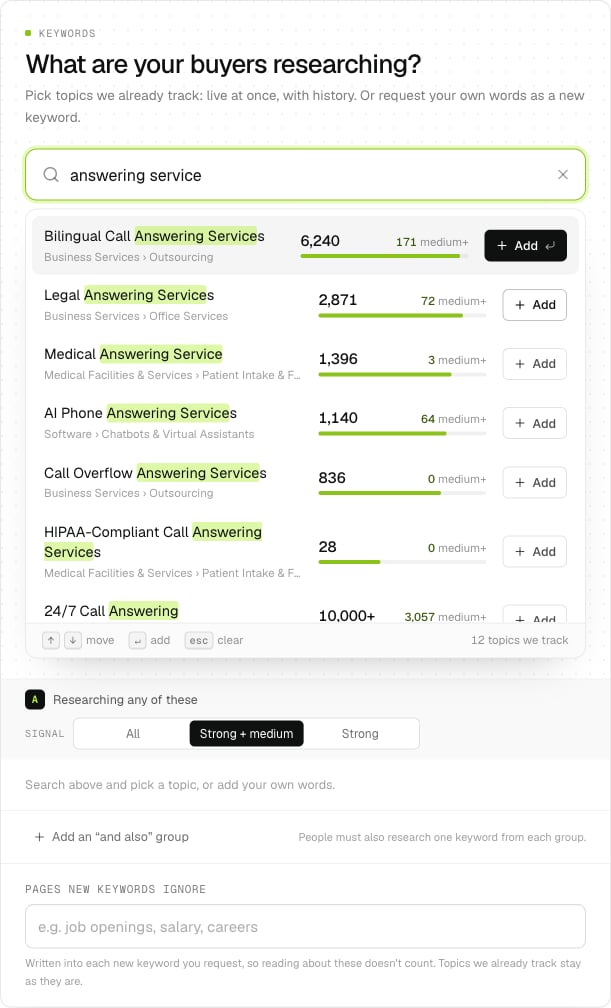
Topics we track appear as you type, with their size on the latest day.
- Dashboard: type in the search, What are your buyers researching?, when you create a lane or on a lane’s Keywords tab. Topics we track appear as you type, each with how many people researched it on the latest day and how many at medium+. Press Add, or ↑ ↓ and Enter. With the search empty, Suggested for you and More like your keywords offer ideas. To ask for something we don’t track, pick Request ”…” as a new keyword at the end of the results. See Choose keywords that work.
- API: search with
GET /api/v1/topics?search=answering service&signal=true, look one up withGET /api/v1/topics/{topic}, then add it with its id:
- CLI:
intentleads topics search "answering service", thenintentleads keywords add --lane L1 --topic tp503611. - MCP:
intent_search_topics, thenintent_add_keywordwithtopic.
"create_new": true (CLI: --new). A keyword that uses an existing topic shows "existing_topic": true and its topic id. Your lane’s “topics to leave out” don’t change an existing topic, because its definition is shared.
On a free account
Until your account has a balance, lanes use topics we already track: search, look at details and add as many as you like, for free. Requesting a new keyword needs a balance. A keyword that doesn’t exactly match an existing topic (or any keyword sent withcreate_new) returns 402 plan_required, with up to five of the closest topics we track in closest_topics (and in the message), so you can add one of those instead:
The search shows business (B2B) topics by default; add
type=b2c or type=all for consumer ones. signal_latest_day is one day’s research before any filter: use it to compare topics, not as people you could export.From request to live
Approval usually takes about a day. A new keyword has no history: it only finds research that happens after it goes live, so add keywords well before you need the leads.
Adding and removing keywords
intentleads keywords add --lane L1 "sales forecasting tool" in the CLI. Approvals are picked up automatically; to check now, call POST /api/v1/lanes/{code}/signals.
In the dashboard, a lane’s Keywords tab lists each keyword with its signal today. Its ⋯ menu has Replace and Remove, and a keyword gets a Very broad or No signal yet flag when it needs a look.
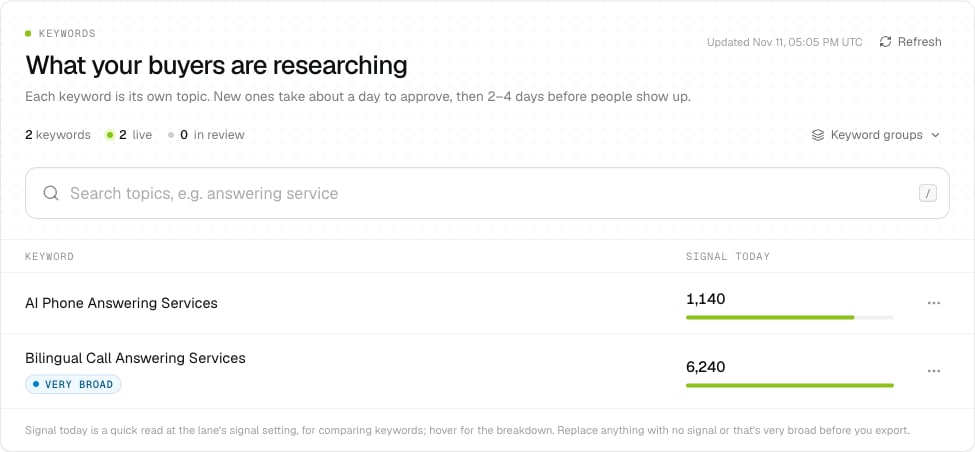
A lane's Keywords tab. Replace anything with no signal, or that's very broad, before you export.
Keyword groups
By default every keyword is in group A, and a lane finds people researching any of them. Groups B, C and D narrow that: a person must also research at least one keyword from each group you use, on any day in the 14-day window.
For example, put
outsourced SDR team and appointment setting agency in group A, and hiring sales development reps in group B. The lane then finds people comparing outsourced options who are also looking at hiring in-house.
GET /api/v1/lanes/{code} shows each keyword’s group and a keyword_groups summary.
The intent window
Signals cover a rolling 14-day window. Someone researching your keyword shows up for about two weeks; if you don’t export them in that time, they drop out. Each lead carries:intent_strength:high,mediumorlowintent_score: how strongly they matched; higher is stronger (it isn’t a percentile)first_seenandlast_active: when the research started and was last seenkeywords_matched: which of your keywords they matched