

Prices
Two price lists, each per person: one for intent leads and website visitors, one for search results. The price drops as your organization (with all its workspaces) gets more people in a billing month, and starts again at the first tier the next month. Only the people inside a tier get that tier’s price. Intent leads and website visitors
Search results
For example, 2,500 intent leads in a month cost $250, 7,500 cost $650, 20,000 cost $1,487.50, 50,000 cost $2,987.50 and 100,000 cost $5,487.50. 10,000 search results cost $500, 100,000 cost $4,500 and 250,000 cost $10,500. More than 100,000 intent leads a month? Talk to us.
What counts
- Intent leads and website visitors: a person counts once per billing month, across all your lanes and sites. If two lanes find the same person, or you export again later in the month, they’re left out rather than charged again. Next month, someone with fresh intent can be exported again; their lead is marked
seen_before: true. - Search: a person counts once, ever. Anyone you’ve already bought from any search lane is left out before we pay.
- Free: creating and changing lanes, keywords and searches; daily checks, estimates, funnels and samples; export quotes (
dry_run: true); downloading an export or your leads again. New keywords need a balance; topics we already track work on any account.
Adding money
- Top up any amount from $250 on the Billing page, or with an admin key:
checkout_url. The balance goes up as soon as the payment clears. The card you pay with is kept for automatic top-ups, so turning them on later needs no new card.
-
Automatic top-up: a set amount ($250 or more) added by card, at two moments:
- When the balance runs low: as soon as the available balance drops below the amount you choose (for example $50).
- On your billing day: once a month.
409 card_required with a card_setup_url: add the card there and the automatic top-up switches on with these settings. {"enabled": false} turns it off, and GET /api/v1/billing/auto-topup shows the settings, the card and the last automatic charge. Each automatic top-up comes with its own invoice.
If a payment fails, automatic top-ups pause, everyone in the organization gets an email, and the Billing page shows Update card (and a link to pay the invoice). A new card pays the failed top-up and starts them again. To be safe, the low-balance top-up runs at most 5 times in one billing month; after that it pauses until you resume it.
Already paying monthly by card with a $250, $500, $1,000 or $2,000 plan? That is your billing-day top-up and keeps working as it is. You can add the low-balance top-up to it on the Billing page; the amount stays one of those four. Cancel the monthly payment, and see invoices and your card, through Invoices and card (POST /api/v1/billing/portal).
Your balance expires only if nothing is added to it or spent from it for 3 months. Any top-up, automatic top-up or export resets the clock, and the Billing page (and expires_at below) shows the date it would expire. Payments aren’t refundable, except where the law requires.
Your balance
GET /api/v1/billing/balance (any key):
expires_at is null when there’s nothing to expire. With an admin key it also lists automatic_top_up (the same as GET /api/v1/billing/auto-topup) and each workspace’s people, dollars and budget this month. Billing months start on the day of your first payment (or your monthly top-up’s renewal day).
What would it cost? GET /api/v1/billing/estimate?meter=intent&quantity=1000 answers for free, at your prices this month. An export’s own dry run shows the exact cost.
When the balance runs out, exports return 402 balance_empty and websites pause until you top up. With the automatic top-up on, the balance tops itself up before that.
Workspaces
Workspaces spend their organization’s balance, and their people count toward the organization’s price tiers. In a workspace, the organization’s people can open ⌘K → Billing to see what it spent this month, where it went by lane, and the organization’s balance it draws on.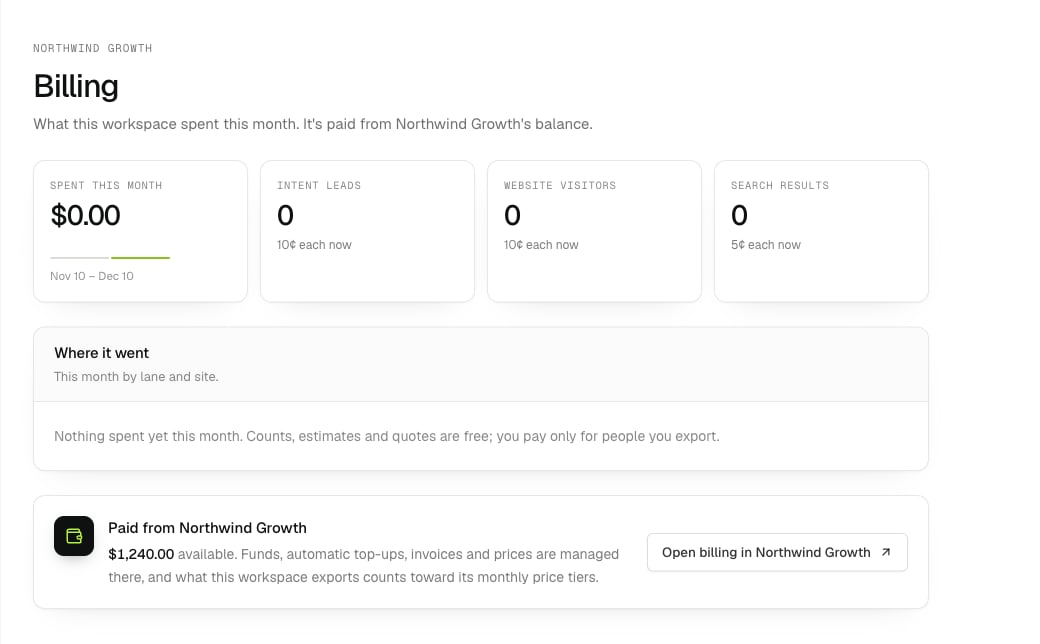
A workspace's Billing: its spend this month, paid from the organization's balance.
Monthly budgets
The organization can give each workspace a monthly budget in dollars. It covers everything the workspace spends (intent leads, search results and website visitors together) and starts again each billing month. Leave it empty for no budget. Set it on the workspace’s page under Workspaces, or with an admin key (null removes it):
GET on the same path returns budget_usd, spent_usd, held_usd (held for exports still running) and left_usd. An export’s quote stops at what’s left of the budget, and once it’s used up the workspace’s websites pause until next month; the workspace and the organization get an email.
Who sees the balance
- People in the organization see its balance wherever money shows, including inside its workspaces.
- People added to a workspace only (a client, say) never see the organization’s balance. They see what the workspace spent this month, and what’s left of its budget if it has one. If the balance runs out, they’re told the organization needs to add funds.
- A workspace’s own API key works the same way:
GET /api/v1/billing/balancereturnsworkspace_budgetinstead of the balance fields, and export quotes returnnullforbalance_before_usdandbalance_after_usd. An organization key acting in a workspace still sees the balance.